Volume Pricing
Volume pricing lets you reward bulk buyers with a better unit price once they reach a quantity threshold. “Buy 50 or more, pay $19 each instead of $22” is a volume tier.
Mental model
Section titled “Mental model”Each tier is (group, product, min_quantity, discount). When a buyer in
that group adds the product to their cart and the quantity reaches
min_quantity, the tier becomes a candidate price. As with price rules,
best price wins at checkout — the buyer always gets the lowest of:
retail, group baseline, price rule, and any qualifying volume tier.
A few useful properties:
- Tiers are per group. Tier 1 and Tier 2 can have different volume pricing for the same product.
- Tiers can be product-level (apply to any variant) or variant-level (override the product tier for one variant).
- Quantities are summed across variants of the same product. A buyer with 30 of variant A and 25 of variant B reaches a “buy 50 or more” tier — both lines pick up the tier price.
Add a volume tier
Section titled “Add a volume tier”- Open Pricing, choose the group, and switch to the Volume tiers tab.
- Click Add tier.
- Pick the product (and optionally a specific variant).
- Enter the minimum quantity. Whole numbers only, ≥ 1.
- Pick Percentage or Fixed price and enter the value.
- Save.
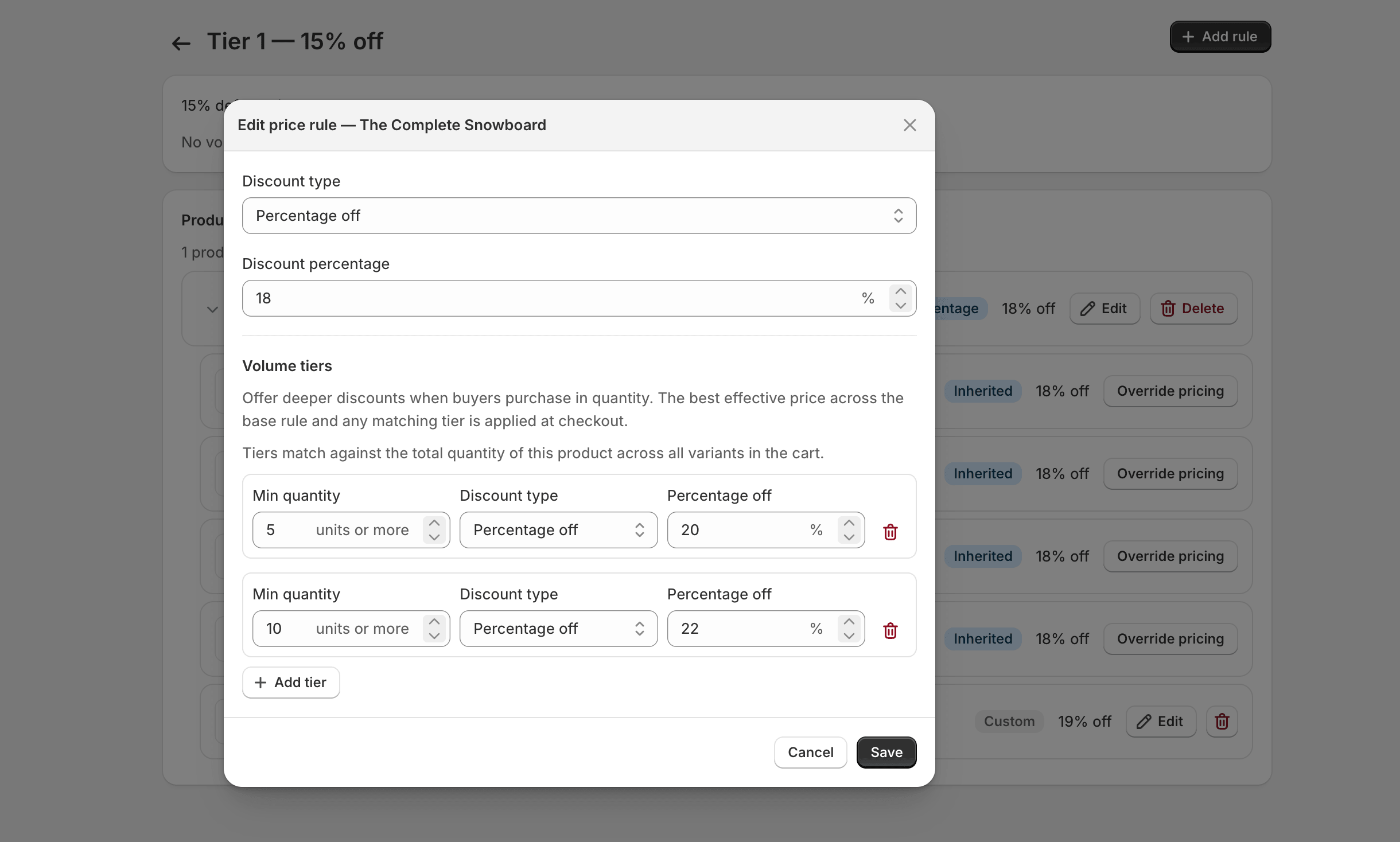
You can stack multiple tiers on the same product:
| Tier | Min qty | Price |
|---|---|---|
| 1 | 25 | 10% off |
| 2 | 50 | 15% off |
| 3 | 100 | $19 fixed |
At checkout the app picks the best tier the buyer qualifies for at their cart quantity, then compares that against the group baseline and any price rule before settling on a final price.
Edit and delete
Section titled “Edit and delete”Tiers are edited the same way as price rules — click the row to open the modal, change values, save. Deleting a tier removes the threshold; buyers at that quantity fall back to whichever rule or baseline is next best.
Plan tiers that work
Section titled “Plan tiers that work”A few patterns we’ve seen work well:
- Three-step ladder: 25 / 50 / 100 thresholds, with discounts spaced about 5 percentage points apart. Easy to understand, leaves headroom for promotions.
- Single-tier nudge: one threshold (e.g. 24 = case quantity) at a meaningful discount. Good when products ship by case.
- Anchor with a fixed price: retail = $30, group baseline = 15% off ($25.50), volume tier at 100 = $19 fixed. The fixed price gives buyers a concrete number to plan POs around.
Avoid tier ladders that overlap with price rules in a way that produces tiny differences (a tier price 10¢ better than the rule). They confuse buyers and make it harder to debug pricing complaints.
Troubleshooting
Section titled “Troubleshooting”The tier price doesn’t show up in cart, but does at checkout. This is expected on some themes. Cart line prices come from the storefront, which doesn’t always know about the wholesale discount. The discount is applied at checkout, so the buyer pays the tier price.
A buyer is at the threshold but the tier isn’t applying. Double-check the quantity logic: tiers sum across variants of the same product, but not across different products. Two different products at qty 25 each don’t reach a “buy 50 or more” tier — each product is counted separately.
Two tiers, same threshold. The app prevents duplicate tiers at the same threshold for a product. If you need different prices for different variants at the same threshold, add variant-level tiers instead.
What’s next
Section titled “What’s next”Most pricing setups are done at this point. Move on to Registration Forms to start collecting wholesale applications.